CLIP·TO·ZERO
$29 · macOS · VST3 / AU / Standalone Demo Buy — $29
v0.5 / macOS · VST3 · AU · Standalone / $29 — one-time

A clipper built around a three-stage workflow.

Stage your input. Drive into the clipper. Judge by the numbers. Each step is a numbered lane in the UI — the plugin tells you what to do next, instead of leaving you to figure out where to put the gain.
Buy — $29 Try the demo 30-day refund · free updates v0.x · Universal binary
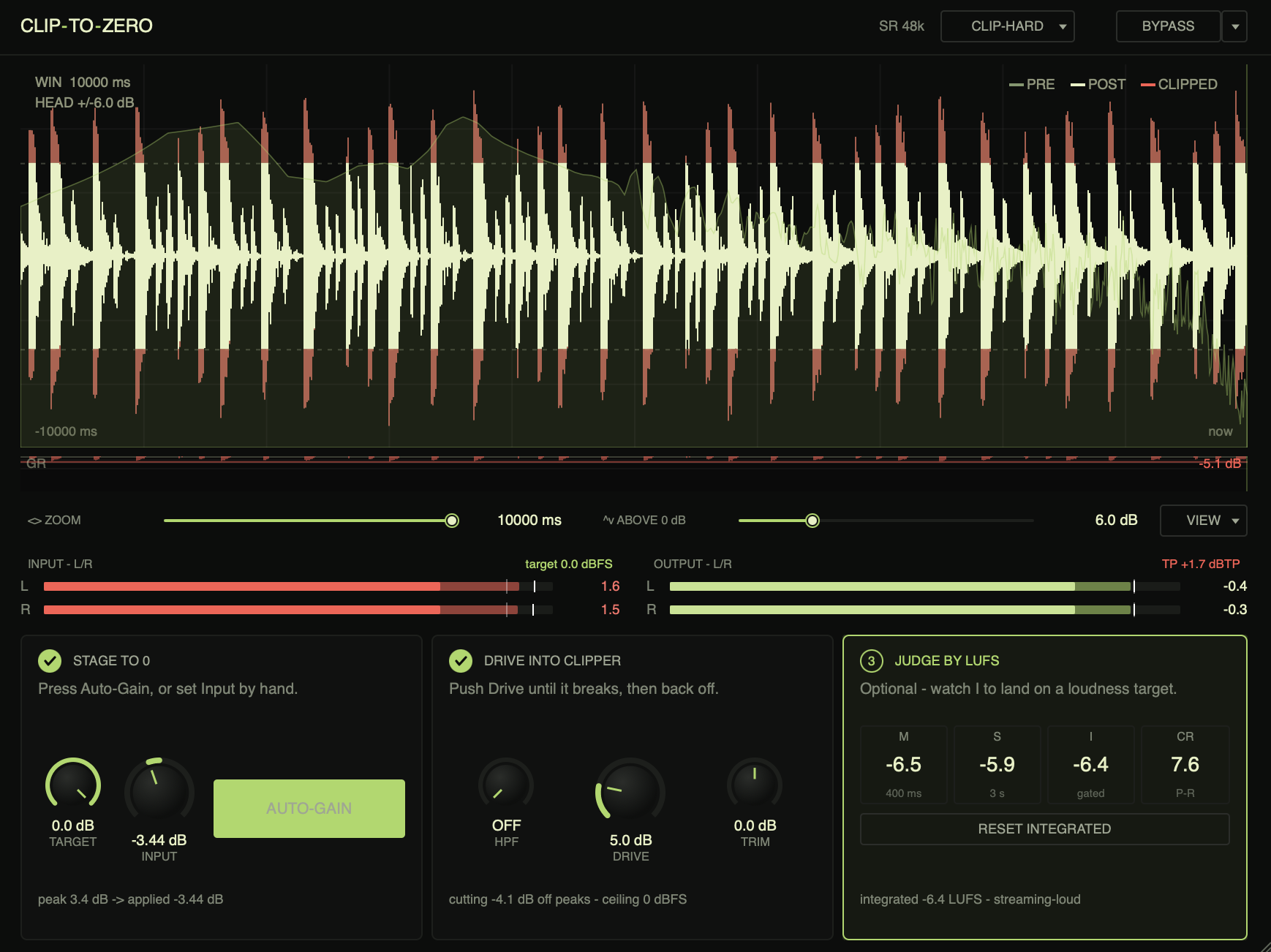
ClipToZero plugin window: the scope shows a real drum loop being clipped to 0 dBFS, both Input meters in red, three stage cards across the bottom — Stage 1 STAGE TO 0 complete (auto-gain applied -3.44 dB), Stage 2 DRIVE INTO CLIPPER pushing 5.0 dB into the clipper, Stage 3 JUDGE BY LUFS showing -6.4 LUFS integrated.
ClipToZero · resizable
STAGE 01

Stage your input to 0 dBFS.

Press Auto-Gain. The plugin captures 2 seconds of audio, finds the loudest peak, and writes the input gain that brings it to your target. No more eyeballing the input meter while a transient slips past.

Or set Input by hand. The target is your call — 0.0 dBFS for full clipping, −1.5 if you want a little safety, anything you like.

  • Capture2 s, peak-hold over the window
  • Target−12.0 → 0.0 dBFS, 0.1 dB steps
  • Input±24 dB, 0.01 dB steps
Stage 1 · STAGE TO 0
Stage 2 · DRIVE
STAGE 02

Drive into the clipper. Stop when you don't like it.

Push Drive until you hear the signal break in a way you can't unhear, then back off. Output is hard-bolted to 0 dBFS regardless of how hard you push — louder doesn't mean blown speakers.

Four curves: Hard (clean, transparent), Soft (rounded knee, less harsh), Poly (polynomial, controllable harmonic content), Tube (asymmetric, even harmonics). 2× / 4× / 8× oversampling. Optional pre-clip HPF, 20–500 Hz, so you can spare the sub from getting smashed.

  • CurvesHard · Soft · Poly · Tube
  • Oversample2× · 4× · 8×
  • Pre-clip HPF20–500 Hz, off by default
  • Ceiling0 dBFS, hard-bolted
STAGE 03

Judge by the numbers, not the volume knob.

ITU-R BS.1770-4 LUFS metering — momentary, short-term, integrated. 4×-oversampled true-peak, crest factor, gain-matched A/B bypass so "louder = better" doesn't bias your ear.

When integrated converges, you know exactly where you landed. −8.2 LUFS is streaming-loud. −14 is broadcast-safe. The plugin doesn't tell you which to aim for — that's your job.

  • LoudnessBS.1770-4 · M / S / I
  • True-peak4× oversampled
  • Crestlive, with history
  • A/Bgain-matched bypass
Stage 3 · JUDGE

Everything else

Oscilloscope

Pre/post overlay. Red highlight where the clipper actually shaved samples. Separate gain-reduction history strip.

Zoom

Horizontal 1 ms – 5 s, skewed toward the precise end. Vertical headroom 0 – 24 dB. See exactly how far above the rails the input is going.

CPU

Single-core, lock-free. 8× oversampling holds at ~2% of one core on M1. No allocations on the audio thread.

Build

JUCE 7. Universal binary, notarised. Tested in Live 12, Logic Pro, Reaper, Cubase, Bitwig, Pro Tools.

Demo limit

Output mutes for 300 ms once every 60 s. No other limits, no time-out, no nag screens.

License

One-time purchase. Three machines per license. No online activation, no phone-home, no subscription.

Link Bypass

One click bypasses every ClipToZero instance in the session — A/B the whole mix at once, no DAW automation hacks.

Source-adjacent

Built by one person. Bug reports go to a real inbox, not a ticketing system. Issues fixed in days, not quarters.

One price, one product, no asterisks.

$29 buys ClipToZero for macOS. VST3, AU, and Standalone in the same installer. Use it on every project you'll ever make.

Try the demo first if you want — the only difference is a 300 ms output mute every minute, so you can hear how it sounds on your material before deciding.

$29 USD · one-time
Refund30 days, no questions asked.
Updatesv0.x free, lifetime.
License3 machines · 1 user.
FormatsVST3, AU, Standalone.
SystemmacOS 11+ · Intel + Apple Silicon.